Figures and galleries
Give an image or a TikZ diagram a caption with :::figure, show several images side by side with :::gallery, and write alt text and captions that work
A plain image sits in the text as it is. A figure turns it into a numbered-style object with a caption: something the text points at ("the figure below shows..."), that a reader can look at on its own. A gallery shows several images as one group, for comparisons and series.
A figure
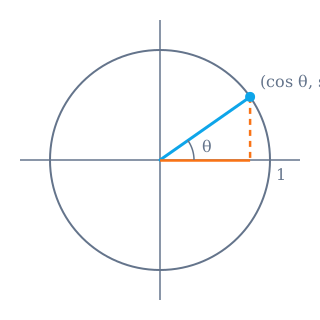
The unit circle. The point at angle has coordinates , so .
::::figure{#fig-unit-circle}

The unit circle. The point at angle $\theta$ has coordinates
$(\cos\theta, \sin\theta)$, so $\cos^2\theta + \sin^2\theta = 1$.
::::The structure is always the same:
- The first block is the content: one image, one TikZ diagram, or one gallery.
- Everything after it is the caption. It can be several sentences and hold inline formatting, links and maths.
{#id}is optional and gives the figure a stable anchor. Use a short, meaningful id ({#fig-convergence}), because it becomes part of a link others can share.- Four colons on the figure fence, because the content may itself be a directive with three.
Click the image, or focus it and press Enter, to open it full screen with pan and zoom. Every image on a page that can be shown larger works the same way, and the viewer steps through them in the order they appear.
A figure with a TikZ diagram
A diagram drawn in TikZ goes in the figure the same way. The diagram is compiled when the publication is saved; see TikZ diagrams.
::::figure{#fig-commutative}
:::tikz
\begin{tikzpicture}
  \node (A) at (0,1) {$A$};
  \node (B) at (2,1) {$B$};
  \draw[->] (A) -- (B);
\end{tikzpicture}
:::

The induced map commutes with the projections.
::::
A gallery
:::gallery shows several images as one group that fits the width of the
text. Put one image per line:
:::gallery


:::A gallery takes images only. A line of text inside it is dropped rather than shown, so captions go outside, or in a figure around it.
A gallery with one caption
To caption a group of images as one figure, make the gallery the figure's content. Note the colons: five on the figure, three on the gallery inside it.
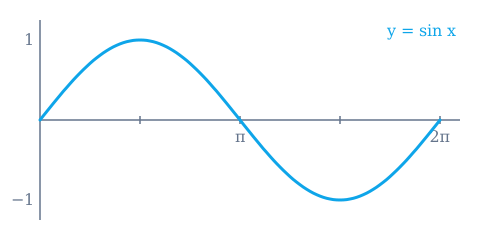
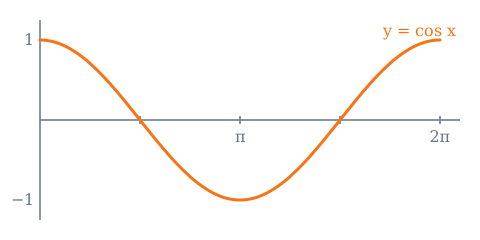
The sine and the cosine over one period. Each is the other shifted by : .
:::::figure{#fig-sine-cosine}
:::gallery


:::
The sine and the cosine over one period. Each is the other shifted by
$\pi/2$: $\cos x = \sin(x + \pi/2)$.
:::::This is the only way to put several images in one figure: a figure always has one content block, and a gallery is how that block holds more than one image.
Writing the alt text
The text in ![...] is what a screen reader announces, what a search engine
reads, and what the page shows if the image cannot load. Write it for someone
who cannot see the image:
- Say what it shows, not that it is an image. "Graph of y = sin x over one period", not "image of a graph" or "figure 1".
- Keep it to a sentence. Detail the reader needs belongs in the caption, which everyone sees.
- Do not repeat the caption. The alt text says what is in the picture; the caption says what it means.
Writing the caption
A good caption lets a reader who looks at the figure first understand it without reading the surrounding text: what is shown, what the axes or colours mean, and the one thing to notice. Start with a short sentence naming the subject, then the detail.
When a plain image is enough
Not every image needs a figure. A small illustration that simply belongs to the paragraph can be a plain image. Use a figure when the image has something to say on its own: a result, a diagram the argument relies on, anything you would refer to from elsewhere in the text.